In a bid to make the models look more 'hand-drawn' with choppy outlines, I've been experimenting with toon outliner even more. The car looks absolutely fantastic with this choppy outline but on the other models, I'm not so sure. The normal outline works very well but I'm unsure if this adds to the look or ruins the effect. I might tweak this outline further on individual models to try and perfect it.
Showing posts with label Render. Show all posts
Monday, 23 April 2018
Wednesday, 18 April 2018
Tuesday, 26 April 2016
Batch Render Test | Door Opening | Render | Fantastic Voyage
Batch Render Test | Door Opening | My Science Project from Beckie Ryan on Vimeo.
This was a test run for batch rendering my animation. This is the opening scene from the pre-viz as the lights and positing are identical to how this scene is laid out in the final scene.
Overall the lighting looks good but I think that I need to find a way to light the stage area a little more with the ambient light.
Frame 184 is missing (un-rendered for some reason) so there is a slight glitch in the animation but this will be resolved for the final piece.
This was a test run for batch rendering my animation. This is the opening scene from the pre-viz as the lights and positing are identical to how this scene is laid out in the final scene.
Overall the lighting looks good but I think that I need to find a way to light the stage area a little more with the ambient light.
Frame 184 is missing (un-rendered for some reason) so there is a slight glitch in the animation but this will be resolved for the final piece.
Monday, 25 April 2016
Sign, Render and Movement Testing | Playblast | Maya | Fantastic Voyage
Sign, Render and Movement Testing | My Science Project from Beckie Ryan on Vimeo.
This is an incomplete playblast of my pre-viz. This was to test the signs, render quality and movement of the objects and signs within the piece.
All of the pieces shown have had their UVs created and basic textures applied. I applied a slightly different top layer to the 'warden tower' which gives it more of a 'painted on cardboard' effect. I think for the final animation, I will apply this texture top layer to all of the pieces to give it more of a realistic look.
This is an incomplete playblast of my pre-viz. This was to test the signs, render quality and movement of the objects and signs within the piece.
All of the pieces shown have had their UVs created and basic textures applied. I applied a slightly different top layer to the 'warden tower' which gives it more of a 'painted on cardboard' effect. I think for the final animation, I will apply this texture top layer to all of the pieces to give it more of a realistic look.
Sunday, 24 April 2016
Early Pre-Viz Renders | Maya | Fantastic Voyage
These are some renders of my early pre-viz. The UVs have been corrected on the cardboard and many of the pieces have had textures especially made for them. These were made to test the lighting and how the components should look when layered correctly.
Friday, 8 April 2016
Pre-viz of Box | Render | Maya | Fantastic Voyage
Maya - pre-viz of box
Maya - pre-vis of open box
I've successfully managed to pre-viz the basic set of my box for the animation. For now, I've also added in a basic cardboard texture to the box to add a bit of depth.
Lighting is a bit of an issue as I keep getting a hot spot at the back but I'm going to try and change some of the lighting and shadow settings to see if this will help.
Monday, 21 December 2015
Thursday, 10 December 2015
Part Textured Scene | Hibernaculumis | Work In Progress | Maya
I've started the texturing process and plotting in some basic window shapes. I'm not sure if they seem too clustered yet but I will add them to the other buildings first in this manor before I make a better decision.
Tuesday, 8 December 2015
Hibernaculumis | Work In Progress | Maya
This is the work that I have completed so far in my Maya scene! With a few small hiccups along the way, I have manage to model all of my buildings which are all looking great! I've mapped out some of the UV's which do need a bit more work on, just to make sure that my textures lie across the surface properly. Finally, I've mapped out a rough version of my city. This isn't my final piece but a great test version which has allowed me to scale all the buildings and set the city layout and the camera angle as well as some basic lighting!
The images above show my progress from when I first imported all the buildings into a test scene and replacing some buildings with better models, to testing lighting and basic UVs. The final image was a test with the matte painting to check the colour of the lighting used in the scene.
My next tasks are:
- to add in windows and doors
- UV the remaining buildings
Monday, 30 November 2015
Alleyway Scene | Complete | Tutorial | Maya
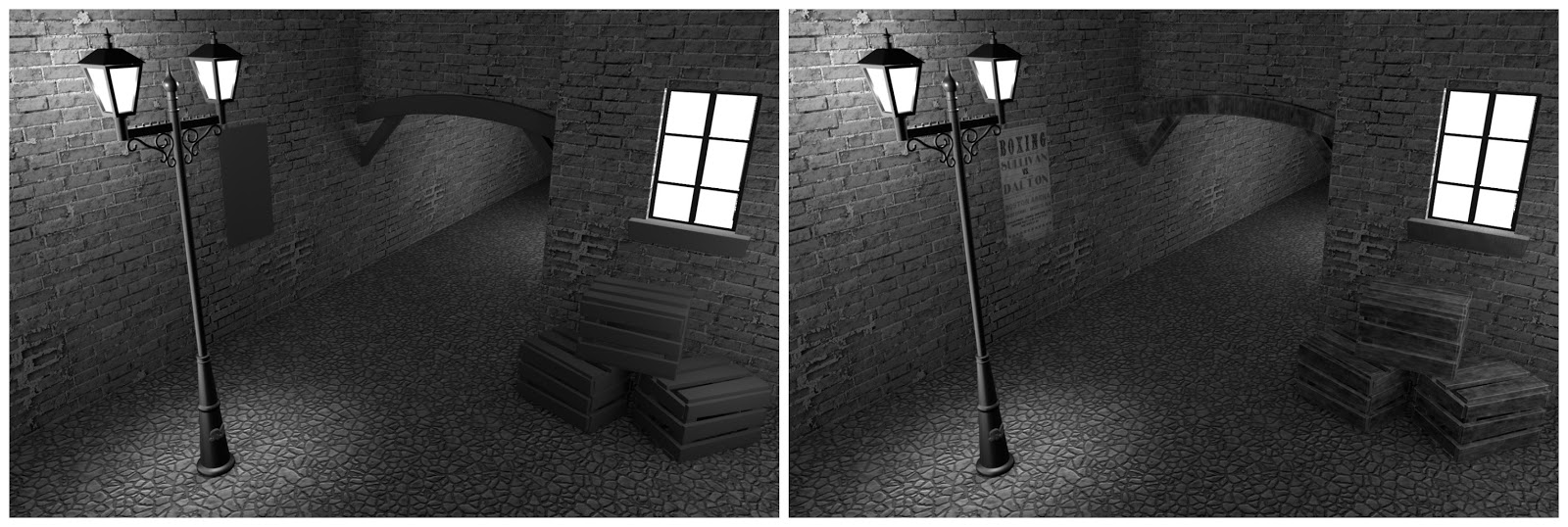
![]() |
| AO pass, Diffuse pass, Matt pass |
![]() |
| Final image after photoshop |
Here is the finished Alleyway scene. This was great to make as I've definitely learnt a lot about this process. It was a lot more intensive than I first thought it would be but it has given me a great insight into what to do with my city when I create that in Maya too.
Texturing | Alleyway Scene | Tutorial | Maya
Saturday, 28 November 2015
Alleyway Update | Lighting | Tutorial | Maya | Screenshots
The lighting is now done for the alleyway scene. These are the 12 renders I took of the scene throughout the process from start to finish.
Wednesday, 14 October 2015
Birthday Cake! | Screenshots | Maya
It's my birthday! People normally have cake to celebrate but being a student = lack of money, so I made a 3D cake for myself instead. At least I won't get the calories from it!
Tuesday, 13 October 2015
Texturing Part 2: UV Layout | Tutorial | Complete | Screenshots | Maya
I struggled a lot with this tutorial, not due to the video itself but due to Maya randomly deciding to start using soft selection for no reason which made it look like lava (see below)
After a bit of help from Charlie, I managed to turn this feature off before starting. I found it a very easy process and can see how it would be helpful in the future but I think I would also need a paper version to work with so I could understand the direction in which the detail would need to go.
Labels:
3d model,
Maya,
MayaTutorial,
photoshop,
Render,
screenshots,
Year 1
Tuesday, 6 October 2015
Texturing Part 1: Common Shaders | Tutorial | Complete | Screenshots | Maya
This is the work from Monday's lesson. Unfortunately there were several problems with the computer I was working on which resulted in it crashing several times, so instead, I took notes and have done it this evening with some help from the online tutorial.
It was great to learn how to render objects in this way, as I think they could come in very handy in the future. I think they all went very well, although I think the gold render does need tweaking as it looks slightly to orange.
Labels:
3d model,
Maya,
MayaTutorial,
Render,
screenshots,
Year 1
Thursday, 1 October 2015
2nd Maya Tutorial | Ray Gun | Extension | Screenshots | Maya
Labels:
3d model,
Maya,
MayaTutorial,
Render,
screenshots,
Year 1
Subscribe to:
Posts (Atom)